
After several beta tests and a long wait, Samsung has finally begun rolling out the stable One UI 8 update in the USA for the Galaxy S25 Series. Earlier, the update was released in South Korea, Germany, the UK, and India.
If you are living in the USA and didn’t receive the update via OTA (Over the Air) notification, head to the settings > Software Update. Here you can refresh the menu, and you can see the official One UI 8 stable update; hit the download button and install it.
In any case, if you don’t find the update even in the Software Update menu, you should wait for a few more days because the update started rolling out from today, and it will take a few days to complete the update for the Galaxy S25 Series.
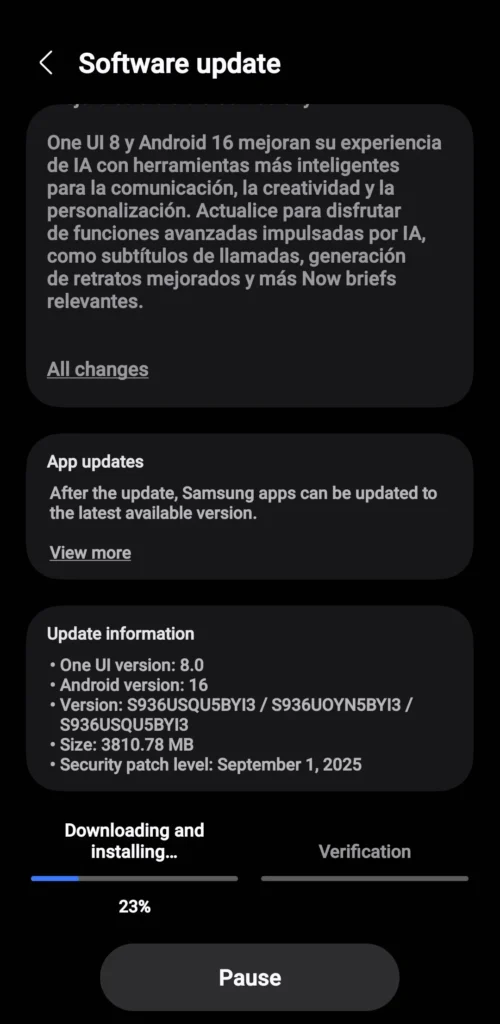
A few Galaxy S25 Series users have started receiving the latest update with firmware version S93xUSQU5BY13/S93xUOYN5BY13/S93xUSQU5BY13, which also includes the September security patch. For those on One UI 7, the new One UI 8 update comes as a 3.8 GB download.
Users have shared screenshots of the update tab, highlighting the rollout details such as the firmware version, security patch, and the Android 16 update.
Here are the eligible device list for the One UI 8 Stable Update—
- Galaxy S25/S25+/S25 Edge/S25 Ultra
- Galaxy S24/S24+/S24 FE/S24 Ultra
- Galaxy S23/S23+/S23 FE/S23 Ultra
- Galaxy S22/S22+/S22 Ultra
- Galaxy S21 FE
- Galaxy Z Fold6/Z Flip6
- Galaxy Z Fold5/Z Flip5
- Galaxy Z Fold4/Z Flip4
- Galaxy A56 5G/A36 5G
- Galaxy A55 5G/A35 5G/A26/A17/A17 5G
- Galaxy A54 5G/A34 5G/A25 5G/A16 5G/A16/A15 5G
- Galaxy A73 5G/A53 5G/A24/A15/A07/A06 5G/A06
- Galaxy A33 5G
- Galaxy Tab S10/S10+/S10 Ultra/S10 FE/S10 Lite
- Galaxy Tab S9/S9+/S9 Ultra/S9 FE
- Galaxy Tab S8/S8+/S8 Ultra
You can also check the timeline schedule to see which devices will be receiving the stable One UI 8 update. The update timeline is revealed via the Samsung Korea Community Tab.
