
Huawei appears to be rolling out a new HarmonyOS software update identified as HarmonyOS 6.1.0.125 SP10, according to a software update screenshot shared on Weibo. The update package is listed at 2.85GB and focuses on photo processing improvements alongside broader system optimizations.
While the update does not introduce a long list of headline features, it targets areas that users interact with frequently, including the Gallery app, application performance, and camera functionality.
For existing HarmonyOS users, the update is noteworthy because it adds new AI-powered image processing capabilities while also refining everyday software experiences.
Key Takeaways
- HarmonyOS 6.1.0.125 SP10 is reportedly rolling out as a 2.85GB update.
- The Gallery app gains a new AI feature designed for backlit portrait images.
- Huawei says the feature can generate a more cinematic visual effect with a single tap.
- The update also includes optimizations for app usage experiences.
- Camera-related improvements reportedly enhance photography performance in some third-party applications.
What’s Included in HarmonyOS 6.1.0.125 SP10
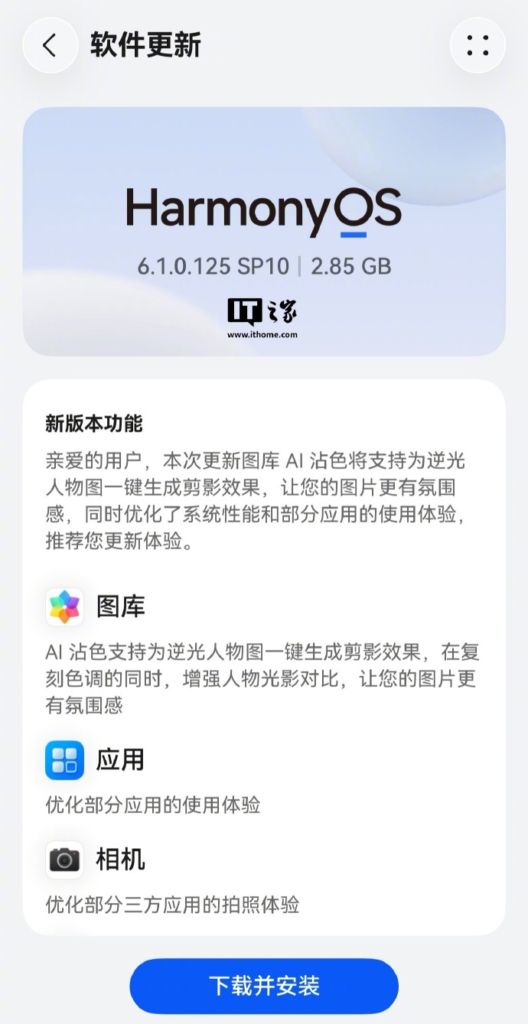
According to the update changelog shown in the screenshot, the most visible addition arrives in the Gallery application.
AI Processing for Backlit Portrait Photos
Huawei states that the Gallery app’s AI image enhancement feature now supports generating cinematic-style effects for backlit portraits with a single tap.
The description indicates that the feature can recreate color tones while strengthening contrast between subjects and lighting. In practical terms, this appears aimed at improving photos where a person is positioned in front of a bright light source, a scenario that often makes subjects appear darker than intended.
The update description suggests the goal is to make images appear more visually dramatic and atmospheric without requiring manual editing.
Application Experience Optimizations
The changelog also references optimizations for certain applications.
Huawei does not provide detailed technical information about which apps are affected or what changes have been made. However, software optimization updates typically focus on improving responsiveness, stability, or usability within supported applications.
Camera Improvements
Another listed change concerns the Camera experience.
According to the update notes, Huawei has optimized the photography experience for some third-party applications. The company does not specify which apps benefit from the changes, so the scope of the improvement remains unclear based on the available information.
Why Huawei Is Focusing on AI Photo Tools
One notable aspect of this update is that Huawei continues to place AI-powered imaging features directly inside core system applications rather than requiring separate editing tools.
For users, that approach can reduce the need for manual photo adjustments after capture. Backlit portraits are among the more challenging situations for smartphone photography, so integrating automated enhancement tools into the Gallery app may help users improve images without advanced editing knowledge.
The update also shows Huawei balancing feature additions with ongoing software refinement. While AI image processing receives the spotlight, the inclusion of application and camera optimizations suggests the company is also addressing day-to-day usability.
What Users Should Watch During the Rollout
Based on the screenshot, HarmonyOS 6.1.0.125 SP10 is a relatively large update at 2.85GB, indicating that users should ensure sufficient storage space and battery capacity before installation.
Beyond the listed features, Huawei has not provided additional details in the available changelog. As the update reaches more devices, users will likely be able to determine whether the app and camera optimizations produce noticeable real-world improvements.
Conclusion
HarmonyOS 6.1.0.125 SP10 appears to be a feature-and-maintenance release centered on AI-assisted photo enhancement. The standout addition is a new Gallery capability for improving backlit portrait images, while application and camera optimizations aim to refine the overall user experience. As the rollout expands, users will be watching to see how these changes perform in everyday use.
Source: Weibo
